
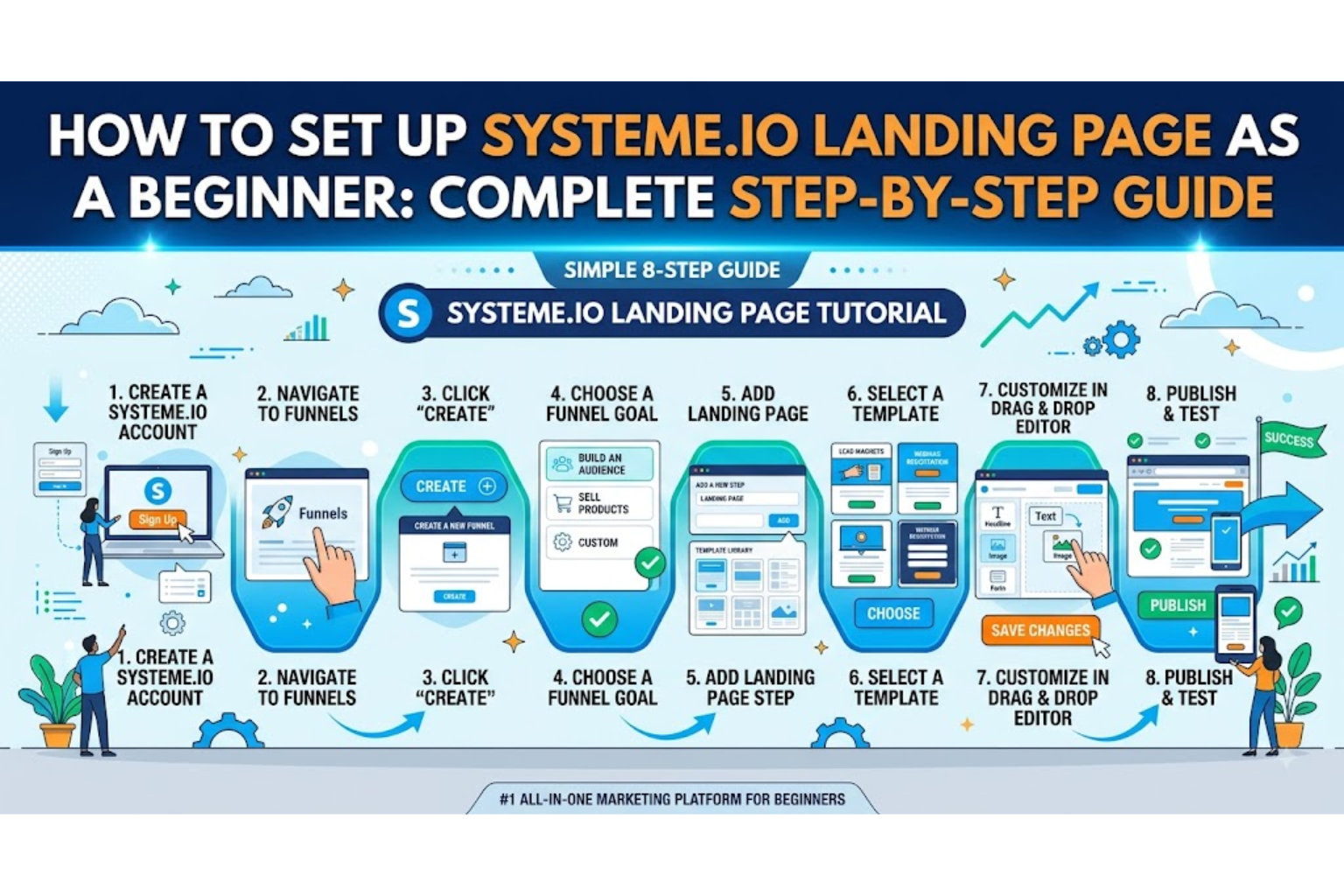

Creating a professional landing page can feel complicated when you are just starting with online marketing. Fortunately, Systeme.io makes the process much easier by combining a drag-and-drop page builder, sales funnels, forms, email marketing, automation, and other marketing tools in one platform.
A Systeme.io landing page can be used to collect email subscribers, promote an affiliate offer, sell a product, register people for a webinar, promote a service, or move visitors into the next stage of a sales funnel.
The best part is that you do not need to know HTML, CSS, or programming to create a landing page. Systeme.io provides templates and a visual editor that allow beginners to build and publish pages without writing code.
This guide explains how to set up a Systeme.io landing page step by step, from choosing your goal and creating a funnel to designing the page, connecting your form, publishing it, and improving conversions.
What Is a Systeme.io Landing Page?
A landing page is a dedicated webpage designed around one primary goal.
Unlike a traditional homepage, which may contain navigation menus, multiple services, blog posts, and several calls to action, a landing page focuses the visitor’s attention on a specific action.
For example, your landing page could ask visitors to:
- Subscribe to an email list
- Download a free ebook
- Register for a webinar
- Start a free trial
- Purchase a product
- Book a consultation
- Learn about an affiliate product
- Request a quote
- Access a free course
Systeme.io describes a landing page as a standalone page built around a single offer and call to action.
For beginners, this single-goal approach is important because it prevents the page from becoming overloaded with unnecessary information.
Why Use Systeme.io to Create a Landing Page?
One of the biggest advantages of Systeme.io is that the landing page does not have to operate as an isolated website.
The page can be connected to other parts of your marketing funnel, including forms, contacts, email campaigns, automation, checkout pages, and sales funnels.
The platform also provides a drag-and-drop website editor, templates, responsive pages, and built-in marketing functionality.
For a beginner, this can reduce the need to combine several different services.
A simple funnel might look like this:
Advertisement → Landing Page → Email Capture → Thank-You Page → Email Sequence → Offer
Once the visitor submits the form, the next steps can be handled by your funnel and automation system.
Step 1: Decide the Goal of Your Landing Page
Before opening the Systeme.io page editor, decide exactly what you want the visitor to do.
This is one of the most important steps.
A landing page should generally have one primary conversion goal. Systeme.io’s own landing-page guidance recommends focusing the page around one action rather than competing offers and links.
For example:
Goal 1: Collect Email Leads
You could offer:
Download Our Free Digital Marketing Checklist
The visitor enters their email address and receives the resource.
Goal 2: Promote an Affiliate Product
You could explain the benefits of a product and use a button such as:
Learn More
The button then sends the visitor to the appropriate offer.
Goal 3: Sell a Product
Your landing page could introduce the product, explain the benefits, provide testimonials, answer objections, and send visitors to checkout.
Goal 4: Register Webinar Attendees
The page can present the webinar topic, date, benefits, speaker information, and registration form.
Beginner tip: Do not start designing until you know the exact action you want visitors to take.
Step 2: Create Your Systeme.io Account
Start by creating a Systeme.io account and entering your dashboard.
Once inside the dashboard, familiarize yourself with the main areas of the platform.
Depending on your account and current interface, you will find features related to:
- Funnels
- Contacts
- Email campaigns
- Automations
- Websites
- Courses
- Products
- Sales
- Settings
For a landing page project, the most important area to start with is the Funnels section.
Step 3: Create a New Funnel
Navigate to the funnel section and create a new funnel.
You will normally need to choose what you want the funnel to accomplish.
For a beginner landing page, an audience-building or lead-generation funnel is a straightforward starting point.
Your funnel could contain:
- Landing Page
- Thank-You Page
- Email Follow-Up
For example:
Traffic
   ↓
Systeme.io Landing Page
   ↓
Visitor enters email
   ↓
Thank-You Page
   ↓
Welcome Email
   ↓
Email Follow-Up Sequence
This simple structure is enough to begin building a basic lead-generation funnel.
Step 4: Choose a Systeme.io Landing Page Template
After creating the funnel, select the landing-page step and choose a template.
Templates can save beginners significant time because you do not have to create every section from an empty page.
When choosing a template, do not select one simply because it looks attractive.
Instead, choose one that matches your conversion objective.
For example:
| Goal | Suitable Page Structure |
|---|---|
| Email collection | Headline + Benefits + Form |
| Ebook download | Headline + Ebook Image + Benefits + Form |
| Webinar | Headline + Webinar Details + Registration |
| Product sale | Benefits + Features + Proof + CTA |
| Affiliate promotion | Problem + Solution + Benefits + CTA |
| Service | Problem + Solution + Benefits + Testimonials + CTA |
Systeme.io provides templates and a drag-and-drop builder for creating landing pages without coding.
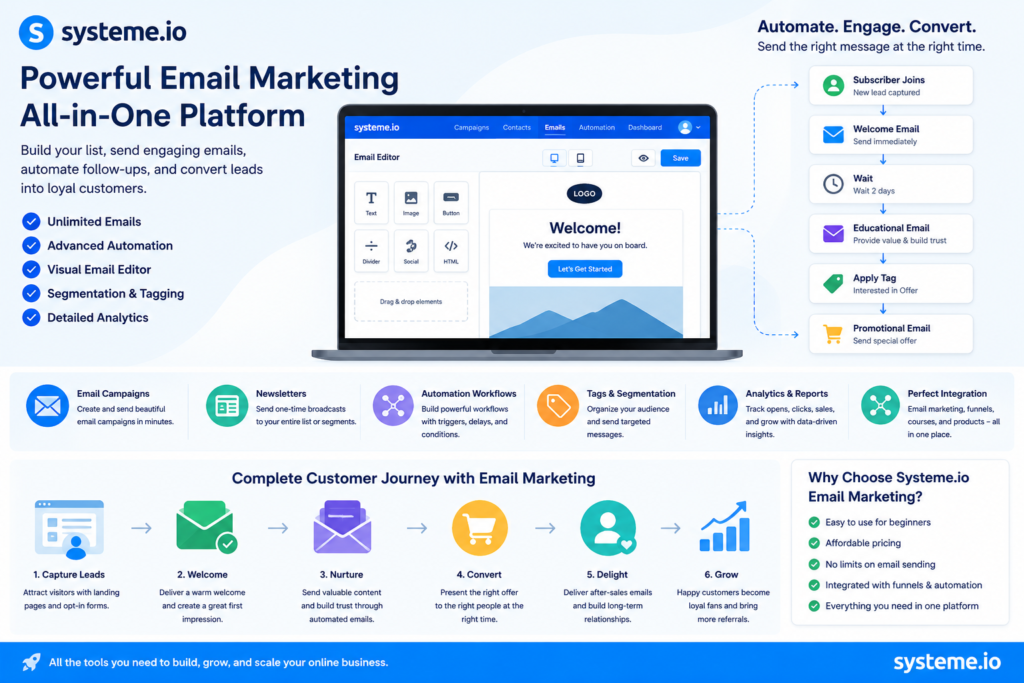
Step 5: Open the Systeme.io Drag-and-Drop Editor
Once you select your template, open the page editor.
The visual editor allows you to modify page elements without manually writing code.
You can work with sections such as:
- Headlines
- Text
- Images
- Buttons
- Forms
- Videos
- Columns
- Testimonials
- Frequently asked questions
- Spacing
- Backgrounds
- Call-to-action sections
The exact controls can change as Systeme.io updates its interface, so focus on the underlying page-building process rather than memorizing the location of individual buttons.
Step 6: Write a Strong Landing Page Headline
Your headline is one of the most important parts of your landing page.
A visitor should understand the basic value of your offer almost immediately.
Avoid vague headlines such as:
Welcome to Our Website
Instead, communicate a specific benefit.
For example:
Build Your First Sales Funnel Without Coding
Or:
Get the Free Beginner’s Guide to Email Marketing
Or:
Learn How to Create High-Converting Landing Pages
The headline should match the promise made in your advertisement, email, social media post, or other traffic source.
Message matching is an important landing-page principle because visitors should feel that the page continues the conversation that caused them to click.
Step 7: Add a Clear Subheadline
The subheadline supports the main headline.
It should explain the offer in more detail and remove ambiguity.
For example:
Headline:
Build Your First Sales Funnel Without Coding
Subheadline:
Follow our beginner-friendly process to create a landing page, capture leads, and start building your online marketing funnel.
The headline gets attention.
The subheadline provides context.
The call to action tells the visitor what to do next.
Step 8: Add an Appropriate Hero Image
Your hero section is the first major visual area of the landing page.
Use an image that supports your offer rather than a random decorative stock photograph.
For example, a marketing landing page could show:
- A funnel diagram
- A dashboard mockup
- An ebook cover
- A product screenshot
- A course preview
- A person using the product
- A relevant illustration
The visual should reinforce the promise of the page.
A strong landing page typically combines the value proposition, relevant visual, benefits, and call to action near the top of the page.
Step 9: Explain the Benefits
Do not only list features.
Explain what the visitor gets from those features.
For example:
Weak Feature-Based Copy
- Drag-and-drop editor
- Email automation
- Funnel builder
- Templates
Stronger Benefit-Based Copy
- Build pages without learning programming
- Automatically follow up with new subscribers
- Guide visitors through a complete marketing funnel
- Launch faster with professionally designed templates
Benefits help visitors understand the practical outcome of your offer.
Step 10: Add Your Lead Capture Form
If your goal is to generate leads, add a form to the landing page.
For many beginner campaigns, a simple form can ask for:
- Name
- Email address
Avoid asking for unnecessary information.
The more information you request, the greater the potential friction.
For example, if someone only needs to receive an ebook, asking for their:
- Phone number
- Company name
- Job title
- Address
- Business revenue
may create unnecessary resistance.
Start with the minimum information you genuinely need.
Step 11: Connect the Form to Your Contacts
Creating a form is only half the process.
You also need to make sure that submitted information goes into the correct contact and automation workflow.
Your funnel should be configured so that when someone submits the form:
Visitor → Form Submission → Contact Created → Tag/Workflow → Follow-Up
This is one of the major advantages of using an integrated marketing platform.
Systeme.io’s landing-page system can connect forms with contact lists and email automation, allowing new leads to move directly into your marketing workflow.
Step 12: Create a Thank-You Page
After submitting the form, visitors should be sent somewhere useful.
A simple thank-you page might say:
Thank You! Your Free Guide Is on Its Way.
Then provide instructions explaining what happens next.
You can also use the page to:
- Confirm successful registration
- Provide immediate access to a resource
- Introduce the next offer
- Invite visitors to follow your social profile
- Explain when they should expect an email
However, do not overwhelm the visitor with too many competing actions.
Step 13: Add a Strong Call-to-Action Button
Your CTA should clearly describe what happens when someone clicks.
Avoid generic text such as:
Submit
Better examples include:
- Get My Free Guide
- Start Learning Today
- Download the Checklist
- Get Instant Access
- Start My Free Trial
- Reserve My Spot
- Learn More
The CTA should communicate the value of taking the next step.
Systeme.io’s landing-page guidance recommends a focused CTA that clearly identifies the intended action or outcome.
Step 14: Add Social Proof
If you have legitimate testimonials, reviews, customer results, or other credible evidence, add them to the page.
Examples include:
“The funnel setup was much easier than I expected.”
You can also include:
- Customer testimonials
- Ratings
- Case studies
- Client logos where permitted
- Verified results
- Relevant statistics
Never create fake testimonials or misleading claims.
Social proof is particularly useful close to the decision point because it can reduce uncertainty before someone takes action.
Step 15: Add an FAQ Section
An FAQ section can address objections before the visitor leaves.
Useful questions might include:
Do I need coding knowledge?
No. The Systeme.io page builder is designed around visual editing rather than requiring users to build pages manually with code.
Can I collect email addresses?
Yes. Landing pages can be connected to forms and contact management.
Can I connect my landing page to email automation?
Yes. The platform integrates landing pages with email marketing and automation functionality.
Can I use a custom domain?
Systeme.io’s website builder supports custom domains.
Step 16: Make Your Systeme.io Landing Page Mobile-Friendly
Do not design only for desktop users.
A significant amount of online traffic comes from smartphones, so your landing page needs to work properly on smaller screens.
Check:
- Headline size
- Button size
- Form width
- Image dimensions
- Text spacing
- Section spacing
- Navigation
- Page loading speed
- Video behavior
Systeme.io’s website builder produces responsive pages, while the editor allows you to adjust the presentation for different screen sizes.
Always preview the page on a phone before sending paid traffic to it.
Step 17: Remove Unnecessary Navigation
A landing page should not necessarily look like a traditional website homepage.
If the objective is to generate a lead, unnecessary navigation can give visitors opportunities to leave the conversion path.
For example, instead of:
Home | About | Blog | Services | Contact | Login
a focused landing page might contain:
Headline → Offer → Benefits → Proof → CTA
Systeme.io’s landing-page guidance specifically recommends removing navigation when it distracts from the primary conversion goal.
Step 18: Configure Your Page SEO Settings
If your landing page is intended to receive organic Google traffic, configure its SEO elements appropriately.
Important elements include:
- SEO title
- Meta description
- URL slug
- Relevant headings
- Useful page content
- Internal links
- Mobile responsiveness
- Page speed
Systeme.io provides editable SEO settings such as title tags, meta descriptions, URL slugs, and page-level code options.
However, not every landing page needs to rank organically.
A landing page created specifically for a paid advertising campaign may be designed primarily for conversion rather than search traffic.
Step 19: Connect Your Custom Domain
If you already own a domain, connecting it can create a more professional experience.
For example:
yourdomain.com/free-guide
is generally more brandable than relying exclusively on a platform-generated address.
Systeme.io’s website builder supports custom domains, allowing businesses to build pages under their own web identity.
Make sure your domain and page URL are easy to remember and relevant to the offer.
Step 20: Test the Entire Funnel Before Launching
This step is extremely important.
Never send paid traffic to a landing page that has not been tested.
Complete the funnel yourself.
Test:
- Landing page loading
- Form submission
- Email capture
- Contact creation
- Tags or automation
- Thank-you page
- Confirmation email
- CTA buttons
- Checkout links
- Affiliate links, if applicable
- Mobile layout
- Desktop layout
A technically attractive page is useless if the form does not capture leads or the CTA sends visitors to the wrong destination.
Step 21: Publish Your Systeme.io Landing Page
Once everything works correctly, publish the page and test the live URL.
Open it in:
- Chrome
- Firefox
- Safari or another browser
- Desktop
- Mobile
Then submit a test lead.
Confirm that the complete journey works from beginning to end.
How to Create a Simple Beginner Systeme.io Landing Page
A beginner-friendly landing page can use this structure:
------------------------------------------------
HEADLINE
Clear benefit-driven promise

SUBHEADLINE
Short explanation of the offer

[ HERO IMAGE ]

PRIMARY CTA / FORM
Name + Email

BENEFITS
✓ Benefit 1
✓ Benefit 2
✓ Benefit 3

HOW IT WORKS
Step 1 → Step 2 → Step 3

SOCIAL PROOF
Testimonials / Reviews

FAQ
Common objections answered

FINAL CTA
Get Started
------------------------------------------------
This structure is simple enough for beginners while providing the essential components of a conversion-focused landing page.
Common Systeme.io Landing Page Mistakes Beginners Should Avoid
1. Using Too Many CTAs
If every section asks visitors to do something different, the page loses focus.
Keep one primary conversion objective.
2. Writing a Weak Headline
Your headline should immediately communicate the value of the offer.
3. Using Too Much Text
Visitors often scan landing pages rather than reading every sentence.
Use:
- Short paragraphs
- Bullet points
- Subheadings
- Bold benefits
- Visual hierarchy
4. Asking for Too Much Information
Keep your form as short as practical.
5. Ignoring Mobile Users
Always test your page on an actual smartphone.
6. Using Fake Testimonials
Only use genuine testimonials and legitimate claims.
7. Sending Traffic Before Testing
Always complete the funnel yourself first.
8. Making the Page Too Complicated
More sections do not automatically mean better conversion.
Every section should have a purpose.
How to Improve Your Systeme.io Landing Page Conversion Rate
Once your page starts receiving visitors, optimization should become an ongoing process.
Start by measuring:
- Visitors
- Leads
- Conversion rate
- Sales
- Revenue
- Traffic source
Then identify where visitors are dropping out.
Instead of changing everything at once, test individual elements such as:
- Headline
- CTA text
- Hero image
- Form length
- Offer
- Testimonials
- Page structure
Systeme.io provides built-in A/B testing and funnel analytics functionality, allowing marketers to compare page variations and identify opportunities for improvement.
Example: Beginner Systeme.io Lead Generation Funnel
Suppose we want to promote a free marketing checklist.
The funnel could look like this:
Landing Page
Headline:
Get the Free 25-Point Digital Marketing Checklist
Subheadline:
Discover the essential marketing steps you should complete before launching your next online campaign.
CTA:
Get My Free Checklist
Form
- Name
Thank-You Page
Your checklist is ready! Check your inbox for access.
Email Automation
Email 1: Deliver the checklist
Email 2: Marketing tips
Email 3: Common mistakes
Email 4: Recommended solution
Email 5: Offer or product recommendation
This creates a simple but useful lead-generation funnel.
Systeme.io Landing Page for Affiliate Marketing
If you are using Systeme.io to promote affiliate products, a landing page can serve as a bridge between your traffic source and the affiliate offer.
For example:
Facebook Ad
     ↓
Landing Page
     ↓
Educational Content
     ↓
"Learn More" CTA
     ↓
Affiliate Offer
Instead of immediately sending cold visitors to an affiliate sales page, the landing page can explain the problem, introduce the solution, establish relevance, and encourage the visitor to take the next step.
The messaging should remain truthful and should clearly avoid misleading claims about earnings, results, or product performance.
Systeme.io Landing Page Best Practices for Beginners
For the best starting point, follow these principles:
One Page, One Goal
Do not make the visitor choose between five different actions.
One Strong Offer
Make the value proposition obvious.
Clear Headline
Explain the primary benefit quickly.
Short Form
Ask only for information you need.
Strong CTA
Tell visitors exactly what happens next.
Relevant Visuals
Use images that reinforce the offer.
Social Proof
Use genuine evidence when available.
Mobile First
Test everything on smartphones.
Fast Loading
Compress large images and avoid unnecessary elements.
Continuous Testing
Use real visitor data to improve the page rather than relying only on personal preferences.
These principles align closely with current landing-page guidance from Systeme.io, which emphasizes focus, message matching, benefits, short forms, clear CTAs, proof, mobile performance, and testing.
Frequently Asked Questions About Systeme.io Landing Pages
Is Systeme.io good for beginners?
Yes. Its drag-and-drop website and landing-page builder allows beginners to create pages without needing traditional coding skills.
Can I create a landing page without coding?
Yes. Systeme.io provides a visual page-building environment where you can create and customize pages without manually coding the layout.
Can I collect email addresses with Systeme.io?
Yes. You can use forms to capture visitor information and connect those contacts to email marketing workflows.
Can I create a sales funnel with a landing page?
Yes. A landing page can serve as the first step of a larger funnel containing additional pages, forms, email follow-up, checkout, and other steps.
Can I use Systeme.io for affiliate marketing?
Yes. You can use a landing page as part of an affiliate marketing funnel, provided your promotions and claims comply with applicable advertising and affiliate disclosure requirements.
Can Systeme.io landing pages rank on Google?
They can, when they provide useful content that satisfies a genuine search intent and are properly configured for SEO. Systeme.io provides page-level SEO controls, although conversion-focused paid-traffic landing pages often have different objectives from SEO pages.
Do I need a separate email marketing platform?
Not necessarily. Systeme.io integrates landing pages with email marketing and automation functionality, which can reduce the need to connect multiple separate tools.
Can I connect my own domain?
Yes. Systeme.io’s website builder supports custom domains.
Systeme.io Landing Page Setup for Beginners
Before launching, make sure you have completed the following:
- Choose one landing page goal
- Define your target audience
- Create your funnel
- Select a suitable template
- Write a benefit-focused headline
- Add a supporting subheadline
- Add a relevant hero image
- Explain the main benefits
- Add your form
- Connect the form to your contacts
- Set up your email automation
- Create a thank-you page
- Add genuine social proof
- Answer common objections
- Create a clear CTA
- Remove unnecessary navigation
- Check your mobile layout
- Configure SEO settings if organic traffic is important
- Connect your custom domain if needed
- Test every link and form
- Submit a test lead
- Publish the page
- Monitor conversions
- A/B test important elements
- Improve the page based on real data
Conclusion
Learning how to set up a Systeme.io landing page as a beginner does not require advanced technical knowledge. The process becomes much easier when the page is built around a clear goal and a simple conversion path.
Start with one audience, one offer, and one CTA. Choose a suitable Systeme.io template, customize the headline and benefits, add your form, connect the page to your email workflow, create a thank-you page, test the complete funnel, and then publish it.
The most important principle is to keep the landing page focused. A visitor should immediately understand what you are offering, why it matters, and what they should do next.
Once the basic page is working, use real traffic and conversion data to improve the headline, offer, form, CTA, design, and messaging. Systeme.io’s integrated funnel, email, and testing capabilities can make that optimization process much easier because the landing page can remain connected to the rest of the marketing journey.
For beginners, the goal should not be to build the most complicated landing page possible. The goal should be to build a clear, fast, trustworthy, mobile-friendly landing page that gives visitors one compelling reason to take the next step.